How it develops a negative
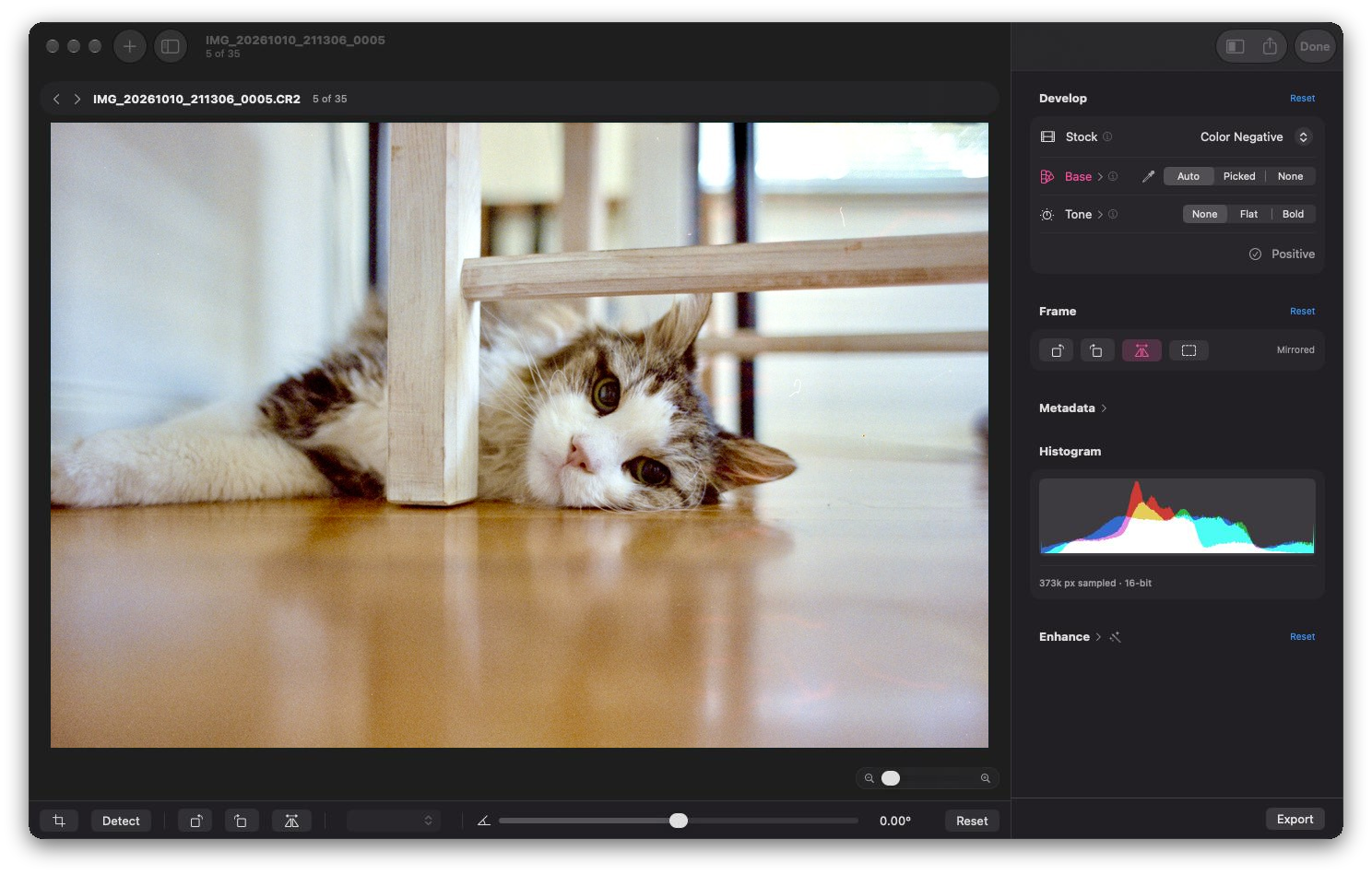
A camera scan of a color negative is a picture of the film base, orange on most color film, with a darker image on it. Film Positive works out how bright and how orange that bare film is, then measures every pixel against it, and that measurement becomes the positive.
Where a film maker publishes a characteristic curve for a stock, the app uses the dye gammas from that sheet. The numbers that describe each film come from the maker, not from my light or my camera.
What it does
I want the simple path to stay simple. For most frames a slider or two gets you most of the way, say for tungsten film shot in daylight, and the rest of the controls are there for the roll that needs more.
-
Auto Color
Tries to read the film base from the frame itself. If you'd rather choose, Pick Film Color lets you click the clear film between frames.
-
Three tones
None is the plain scan, Flat is even and editable, and Bold adds contrast for the look of a lab print. Flat puts black and white in the same place on every frame, so a roll matches.
-
Looks and sliders
After develop, Looks are one-tap presets of the enhancement sliders: exposure, highlights and shadows, warmth and tint, sharpness, halation, and more. You can save your own and export them.
-
Crop and straighten
Detect Crop finds the film edge across a selection, with the aspect ratio picked up front. Nothing crops or rotates on its own. Straighten and quarter turns are there when you need them.
-
Export
One frame or a whole selection, to 16‑bit TIFF or PNG, HEIC, AVIF, JPEG, or JPEG XL, in sRGB or Display P3, with the color profile embedded.
-
Small, plain files
Each frame's settings live in a small sidecar file next to the scan. Each film stock is a small profile file, and you can import new ones from Settings.
Caveats
It's still in development, and there are a few things worth knowing.
- I've only tested it with Canon raw files from a small set of cameras.
- Color is still being tuned against real film datasheets, so results can shift between releases.
- So far, a stock gets its own profile only when its maker publishes a characteristic curve for it. Everything else goes through a general color negative profile for now (almost any color negative should work with it, even the ones that have their own curve).
- There's no dust and scratch removal yet. It's on the list below.
It also sticks to developing. Driving the camera during the scan is Film Tether's job.
Where it's heading
No specific timeline. This is roughly the order I expect things to land.
- A profile editor in Settings, so you can make a film profile, adjust its dye gammas, and see what changed without opening a text editor.
- More custom stocks as I test them. These are profiles I measure myself from a color chart shot on a known setup, for films with no published curve.
- Dust and scratch removal that works from the image alone, since a camera scan has no infrared channel, plus a brush for anything it misses.
Requirements
- macOS 14+ on any Mac, Intel or Apple Silicon
- Camera scans of your negatives, raw files, one frame per file
- Color or black and white negatives
Goes with Film Tether
Film Tether is the other app. It drives a Canon EOS body over USB so you can preview and fire shots from your Mac, and it can record which film stock you're scanning. Film Positive picks that up the first time it develops the frame.
If you're curious how the two fit into the rest of it, I wrote up how I develop and scan film at home.